In March 2016 support design library update Google announced that there’s a new element to be added in Material Design components and it’s the Bottom Navigation View. As per documentation it should be used when application has three to five top-level destinations. Basically this is same as Tab Layout but with some more enhancement and animations. Although it is same but you can not use view pager with it. as it also explained as bad practice by google material design guidelines.
Why we need Bottom Navigation View and Tab Layout both ?
This is really great question we should ask google support library developers. but according to me most of the people liked to use phone with just one hand. with that and huge size of mobile screen you can change tabs if they are at bottom not on top. so may be considering UIUX google may have added this beautiful component in support library so you can implement it with back word compatibility also.
Today in this tutorial I am going to cover Bottom Navigation View with fragments. In Bottom view you can provide options using menu resource file or using inflateMenu(int resId) method. For this tutorial i have used five (max) value so you can confirm how it looks.
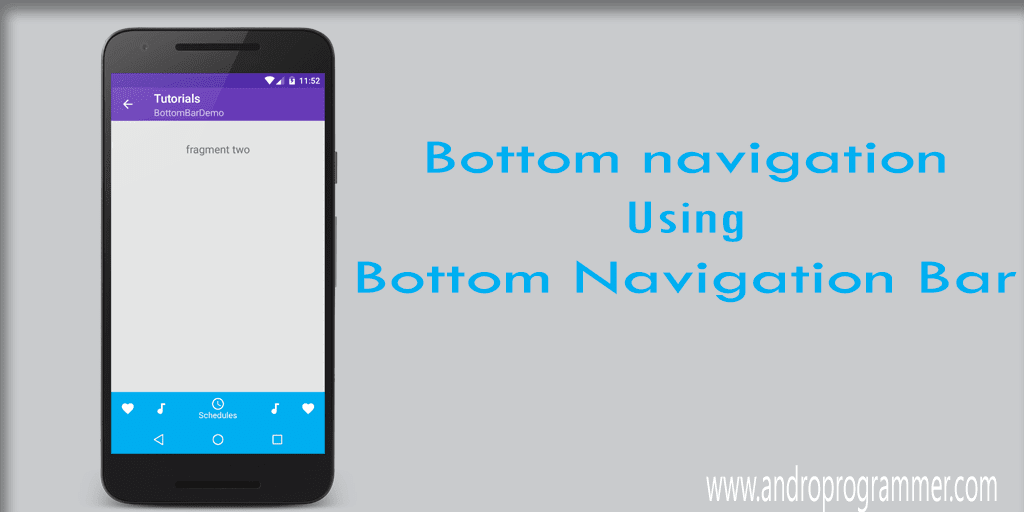
To add Bottom navigation view you have to include support design library.
compile "com.android.support:design:25.0.1"
Now you have to put bellow code in your layout file.
<?xml version="1.0" encoding="utf-8"?>
<android.support.design.widget.CoordinatorLayout
    xmlns:android="http://schemas.android.com/apk/res/android"
    xmlns:app="http://schemas.android.com/apk/res-auto"
    android:layout_width="match_parent"
    android:layout_height="match_parent">
  <RelativeLayout
      android:layout_width="match_parent"
      android:layout_height="match_parent">
    <FrameLayout
        android:id="@+id/fragmentContainer"
        android:layout_width="match_parent"
        android:layout_height="match_parent"
        android:layout_above="@+id/bottom_navigation"
        />
    <android.support.design.widget.BottomNavigationView
        android:id="@+id/bottom_navigation"
        android:layout_width="match_parent"
        android:layout_height="wrap_content"
        android:layout_alignParentBottom="true"
        app:itemBackground="@color/primary_green"
        app:itemIconTint="@drawable/nav_item_color_state"
        app:itemTextColor="@drawable/nav_item_color_state"
        app:menu="@menu/bottom_navigation_main"
        app:layout_scrollFlags="scroll|enterAlways|snap"
        />
  </RelativeLayout>
</android.support.design.widget.CoordinatorLayout>
app:menu : Menu resource file (options to be displayed).
app:itemIconTint : Change icon color when gets selected.
app:itemBackground : background color by default it will be your app primary color.
Now layout part is set. For color codes and images and other resources check out my repo on Github.
BottomBarDemo.java
package com.androprogrammer.tutorials.samples;
import android.os.Build;
import android.os.Bundle;
import android.support.annotation.NonNull;
import android.support.design.widget.BottomNavigationView;
import android.app.Fragment;
import android.support.v4.content.ContextCompat;
import android.support.v4.graphics.drawable.DrawableCompat;
import android.transition.Explode;
import android.transition.Transition;
import android.view.LayoutInflater;
import android.view.MenuItem;
import android.view.View;
import android.view.Window;
import com.androprogrammer.tutorials.R;
import com.androprogrammer.tutorials.activities.Baseactivity;
import com.androprogrammer.tutorials.fragments.FragmentOne;
import com.androprogrammer.tutorials.fragments.FragmentThree;
import com.androprogrammer.tutorials.fragments.FragmentTwo;
import com.androprogrammer.tutorials.util.Common;
import butterknife.Bind;
import butterknife.ButterKnife;
public class BottomBarDemo extends Baseactivity {
 @Bind(R.id.bottom_navigation)
 BottomNavigationView bottomNavigation;
 private View viewLayout;
 private static final String TAG = "BottomBarDemo";
 private int[] bottomBarColors;
 @Override
 protected void onCreate(Bundle savedInstanceState) {
  if (Build.VERSION.SDK_INT >= Build.VERSION_CODES.LOLLIPOP) {
   getWindow().requestFeature(Window.FEATURE_CONTENT_TRANSITIONS);
   //set the transition
   Transition ts = new Explode();
   ts.setDuration(5000);
   getWindow().setEnterTransition(ts);
   getWindow().setExitTransition(ts);
  }
  super.onCreate(savedInstanceState);
  setReference();
  setSimpleToolbar(true);
  setToolbarElevation(getResources().getDimension(R.dimen.elevation_normal));
  setToolbarSubTittle(this.getClass().getSimpleName());
  getSupportActionBar().setDisplayHomeAsUpEnabled(true);
  int themeColor = Common.getThemeColor(this, R.attr.colorPrimary);
  bottomBarColors = new int[]{
    themeColor,
    R.color.color_skype1,
    R.color.color_blogger,
    R.color.color_gPlus,
    R.color.color_whatsApp
  };
  // For the first time setup
  changeBottomBarColor(bottomNavigation, 0);
  changeFragment(0);
  bottomNavigation.setOnNavigationItemSelectedListener(
    new BottomNavigationView.OnNavigationItemSelectedListener() {
     @Override
     public boolean onNavigationItemSelected(@NonNull MenuItem item) {
      switch (item.getItemId()) {
       case R.id.action_favorites:
        changeBottomBarColor(bottomNavigation, 0);
        changeFragment(0);
        break;
       case R.id.action_schedules:
        changeBottomBarColor(bottomNavigation, 1);
        changeFragment(1);
        break;
       case R.id.action_music:
        changeBottomBarColor(bottomNavigation, 2);
        changeFragment(2);
        break;
       case R.id.action_music1:
        changeBottomBarColor(bottomNavigation, 3);
        changeFragment(3);
        break;
       case R.id.action_favorites1:
        changeBottomBarColor(bottomNavigation, 4);
        changeFragment(4);
        break;
      }
      return true;
     }
    });
 }
 @Override
 public void setReference() {
  viewLayout = LayoutInflater.from(this).inflate(R.layout.activity_bottombar_demo, container);
  ButterKnife.bind(this, viewLayout);
 }
 @Override
 public boolean onOptionsItemSelected(MenuItem item) {
  // Handle action bar item clicks here. The action bar will
  // automatically handle clicks on the Home/Up button, so long
  // as you specify a parent activity in AndroidManifest.xml.
  switch (item.getItemId()) {
   // Respond to the action bar's Up/Home button
   case android.R.id.home:
    finish();
    overridePendingTransition(0, R.anim.activity_close_scale);
    break;
  }
  return super.onOptionsItemSelected(item);
 }
 /**
  * To change bottom bar color on the basis of index
  * @param bottomNavigationView bottom bar object
  * @param index menu index
  */
 private void changeBottomBarColor(BottomNavigationView bottomNavigationView, int index) {
  if (bottomBarColors != null) {
   int colorCode = 0;
   if (index == 0) {
    colorCode = bottomBarColors[index];
   } else {
    colorCode = ContextCompat.getColor(BottomBarDemo.this, bottomBarColors[index]);
   }
   DrawableCompat.setTint(ContextCompat.getDrawable(BottomBarDemo.this,
     R.drawable.drawable_bottombar_color),
     colorCode);
   bottomNavigationView.setItemBackgroundResource(R.drawable.drawable_bottombar_color);
   if (android.os.Build.VERSION.SDK_INT >= Build.VERSION_CODES.LOLLIPOP) {
    // If you want to change status bar color
    //getWindow().setStatusBarColor(ContextCompat.getColor(BottomBarDemo.this, colorCode));
    // If you want to change bottom device navigation key background color
    getWindow().setNavigationBarColor(colorCode);
   }
  }
 }
 /**
  * To load fragments for sample
  * @param position menu index
  */
 private void changeFragment(int position) {
  Fragment newFragment = null;
  if (position == 0) {
   newFragment = new FragmentOne();
  } else if (position % 2 != 0) {
   newFragment = new FragmentTwo();
  } else {
   newFragment = new FragmentThree();
  }
  getFragmentManager().beginTransaction().replace(
    R.id.fragmentContainer, newFragment)
    .commit();
 }
}
That's it from my side. now run the app and see the result. if you have any query or suggestion please let me know in below comment box.
keep coding... :)
Source code
.png "Let's Start with Material Design Part -2")
.png "Let's Start with Material Design Part -2")