SQLite is best and lite weight database in mobile operating system. you can do all operation in SQLite like in all other database. If you have Lots of Records and want to display all detail of database you can use list view using different component of android like Text view ,Rating bar, Button etc .You can do main 4 types of operation on database like Select, update, delete and display. I will do all these operation but it having too much coding so I am gone break this in 2 part. So this is part-1 of database operation and I am gone cover insert and database helper class which is for connection between application and database. i have written all methods in this class so if i want any method like insert or update or create i can use this in all activity. This is re-usability of code so you don't have to write code in each activity. in this tutorial and in part-2 display, update and delete operation will be explain. In this tutorial I have used Product table in which user(Admin) can add product detail like name, description , rating or star to the product and available quantity.
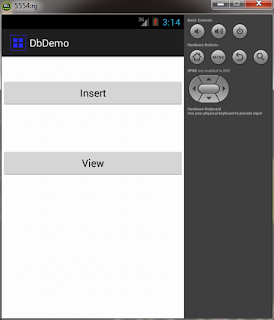
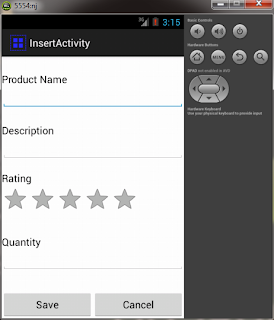
In this tutorial I have used only one table but you can take any number of table. one thing you have to consider is cursor require “_id” field as per android document. Cursor will fetch record on the basis of “_id” column so you have to add this field in your table. if you have any query or problem then post in below comment box.
Keep coding and cheers ... =D
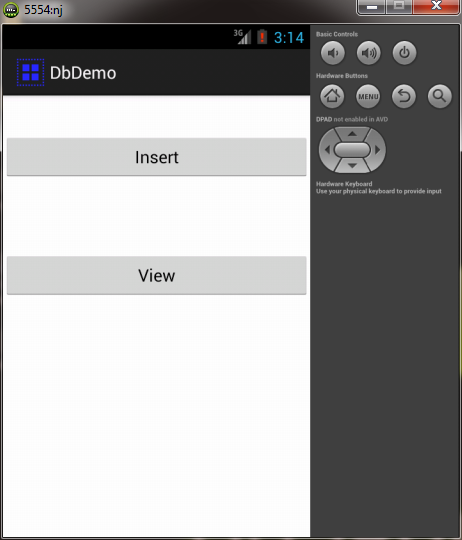
Main.xml
Main.java
package com.example.dbdemo;
import android.app.Activity;
import android.content.Intent;
import android.os.Bundle;
import android.view.Menu;
import android.view.View;
import android.widget.Button;
public class Main extends Activity {
 Button insert,view;
 public static boolean isDbCreated = false;
 @Override
 protected void onCreate(Bundle savedInstanceState) {
  super.onCreate(savedInstanceState);
  setContentView(R.layout.activity_main);
  insert = (Button) findViewById(R.id.button1);
  view = (Button) findViewById(R.id.button4);
  insert.setOnClickListener(new View.OnClickListener() {
   @Override
   public void onClick(View v) {
    // TODO Auto-generated method stub
    Intent insert = new Intent(getApplicationContext(),InsertActivity.class);
    startActivity(insert);
   }
  });
  view.setOnClickListener(new View.OnClickListener() {
   @Override
   public void onClick(View v) {
    // TODO Auto-generated method stub
    Intent view = new Intent(Main.this,Display.class);
    startActivity(view);
   }
  });
 }
 @Override
 public boolean onCreateOptionsMenu(Menu menu) {
  // Inflate the menu; this adds items to the action bar if it is present.
  getMenuInflater().inflate(R.menu.main, menu);
  return true;
 }
}
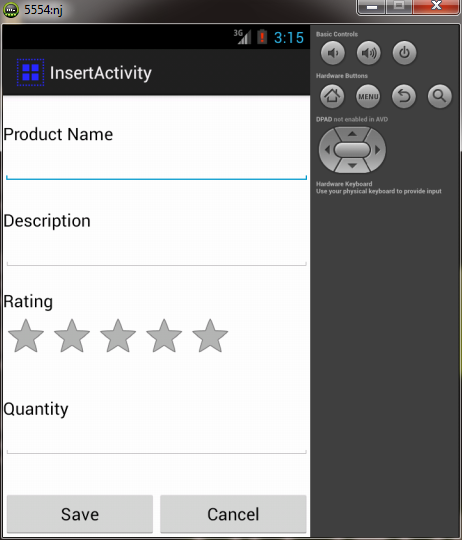
activity_Insert.xml
InsertActivity.java
package com.example.dbdemo;
import android.app.Activity;
import android.app.Dialog;
import android.os.Bundle;
import android.view.Menu;
import android.view.View;
import android.widget.Button;
import android.widget.EditText;
import android.widget.RatingBar;
import android.widget.RatingBar.OnRatingBarChangeListener;
public class InsertActivity extends Activity {
 Button save,cancel;
 EditText name,desc,quantity;
 RatingBar rb;
 float ratings;
 int quan = 0;
 @Override
 protected void onCreate(Bundle savedInstanceState) {
  super.onCreate(savedInstanceState);
  setContentView(R.layout.activity_insert);
  save = (Button) findViewById(R.id.btsave);
  cancel = (Button) findViewById(R.id.btcancel);
  name = (EditText) findViewById(R.id.editText1);
  desc = (EditText) findViewById(R.id.editText2);
  quantity = (EditText) findViewById(R.id.editText3);
  rb = (RatingBar) findViewById(R.id.ratingBar1);
  rb.setOnRatingBarChangeListener(new OnRatingBarChangeListener() {
   @Override
   public void onRatingChanged(RatingBar ratingBar, float rating,
     boolean fromUser) {
    // TODO Auto-generated method stub
    ratings = rating;
   }
  });
  final DbHelper helper = new DbHelper(InsertActivity.this);
  save.setOnClickListener(new View.OnClickListener() {
   @Override
   public void onClick(View v) {
    // TODO Auto-generated method stub
    boolean inserted = true;
    try {
      String pname = name.getText().toString();
      String des = desc.getText().toString();
      quan = Integer.parseInt(quantity.getText().toString());
      helper.open();
      helper.insert(pname , des , ratings , quan);
    } catch (Exception e) {
     // TODO: handle exception
     inserted = false;
     e.printStackTrace();
    }
    finally
    {
     if(inserted)
     {
      Dialog d = new Dialog(InsertActivity.this);
      d.setTitle("Success..");
      d.show();
     }
     helper.close();
     name.setText("");
     desc.setText("");
     quantity.setText("");
    }
   }
  });
  cancel.setOnClickListener(new View.OnClickListener() {
   @Override
   public void onClick(View v) {
    // TODO Auto-generated method stub
    finish();
   }
  });
 }
 @Override
 public boolean onCreateOptionsMenu(Menu menu) {
  // Inflate the menu; this adds items to the action bar if it is present.
  getMenuInflater().inflate(R.menu.insert, menu);
  return true;
 }
}
DbHelper.java
package com.example.dbdemo;
import android.content.ContentValues;
import android.content.Context;
import android.database.Cursor;
import android.database.SQLException;
import android.database.sqlite.SQLiteDatabase;
import android.database.sqlite.SQLiteOpenHelper;
public class DbHelper {
 public static final String DB_NAME = "mydb.db";
 public static final int version = 1;
 public static final String product_table = "tblproduct";
 public static final String Emp_table = "Employee";
 public static final String order_id = "_id";
 public static final String pname = "pname";
 public static final String desc = "desc";
 public static final String quantity = "quantity";
 public static final String rating = "rating";
 private SQLiteDatabase ourdb;
 private databaseHelper ourHelper;
 public Context ourContext;
 public DbHelper(Context c)
 {
  ourContext = c;
 }
 private class databaseHelper extends SQLiteOpenHelper
 {
  public databaseHelper(Context context) {
   // TODO Auto-generated constructor stub
   super(context, DB_NAME, null, version);
  }
  @Override
  public void onCreate(SQLiteDatabase db) {
   // TODO Auto-generated method stub
   db.execSQL("create table " + product_table +" ( "+ order_id + " INTEGER PRIMARY KEY AUTOINCREMENT , " + pname + " TEXT NOT NULL ," + desc + " TEXT ,"
      + rating + " INTEGER ," + quantity +" INTEGER );");
  }
  @Override
  public void onUpgrade(SQLiteDatabase db, int oldVersion, int newVersion) {
   // TODO Auto-generated method stub
  }
 }
 public DbHelper open() throws SQLException
 {
  databaseHelper ourHelper = new databaseHelper(ourContext);
  ourdb = ourHelper.getWritableDatabase();
  return this;
 }
 public void close()
 {
  ourdb.close();
 }
 public long insert(String name, String des, Float ratings, int quan) throws SQLException
 {
  // TODO Auto-generated method stub
  ContentValues cv = new ContentValues();
  cv.put(pname, name);
  cv.put(desc, des);
  cv.put(rating, ratings);
  cv.put(quantity, quan);
  return ourdb.insertOrThrow(product_table, null, cv);
 }
}
In this tutorial I have used only one table but you can take any number of table. one thing you have to consider is cursor require “_id” field as per android document. Cursor will fetch record on the basis of “_id” column so you have to add this field in your table. if you have any query or problem then post in below comment box.
Keep coding and cheers ... =D
0 comments :
Post a Comment